
Execution & Queries
Branching, Guards & Execution
Control routing, preconditions, rejection, and repeated execution explicitly.
- Audience
- Working with Flow Core
- Time
- 10 minutes
- Requires
- A graph with more than one possible route
- Modules
- Flow Core
On this page
Flow Core separates route selection, pre-execution checks, and busy-node behavior. Keeping those decisions distinct makes failures and repeated events easier to explain.
Branching chooses a route
Use a branching node when the graph should visibly select between outputs. If/Else, Switch, Gate, selectors, and module-specific result ports make different decisions, but each exposes the route in graph topology.
Name or arrange the downstream paths so their results are obvious. A branch should lead to an observable responsibility, not disappear into unrelated work.
Guards decide whether a node may execute
A Guard is a Condition group evaluated before the node performs its behavior. Conditions answer pass or fail; they should not perform gameplay side effects.
Select the node and expand its Guard in the Flow Inspector or Node Editor. Expand the Condition you are configuring; Single Focus retains the parent Guard or group while showing that leaf’s fields. Use More > Open Editor for a separate Condition window, or Information for its documented inputs. Keep the Condition’s Enabled and inversion controls distinct from its disclosure arrow: folding changes the view, while those controls change evaluation.
When a Guard rejects execution, Reject Result controls how the chain interprets that rejection. Use the configured Invalid or Abort behavior deliberately:
- Invalid is useful when rejection is an expected non-result that surrounding logic can handle.
- Abort is useful when the rejection should terminate the active route visibly.
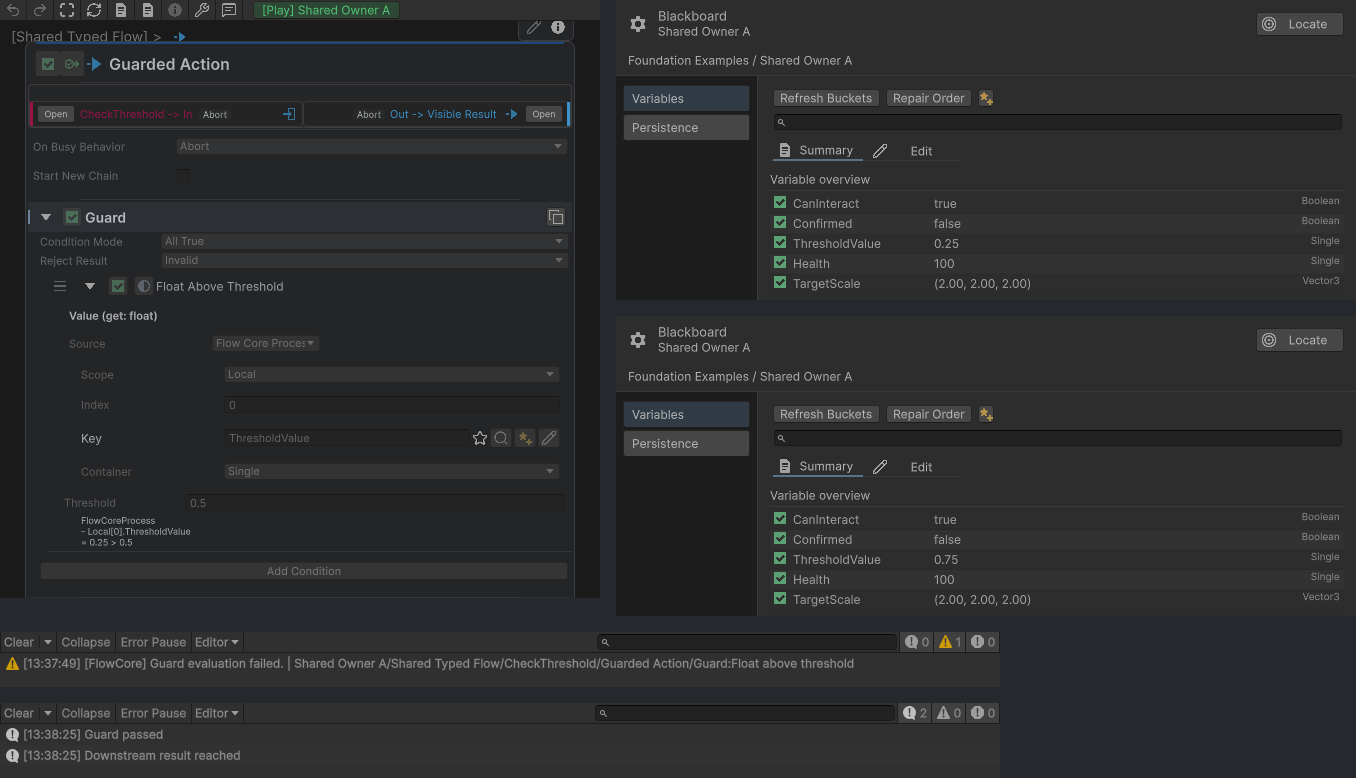
ThresholdValue 0.25 rejects the Action with Invalid and records the expected Guard warning. At 0.75, the Guard passes and reaches the downstream result.
Invoke Mode handles repeated execution
A node may receive another chain while it is already running. Invoke Mode, shown as On Busy Behavior in the Node Editor, defines what happens in that busy state, such as queuing required work, bypassing a repeat, or returning a terminating result.
Choose based on gameplay ownership:
| Requirement | Typical intent |
|---|---|
| Every request must execute in order | Queue the work and monitor backlog. |
| Only the latest or first visible response matters | Bypass or reject repeated work. |
| New work should cancel the previous route | Use the supported abort behavior at the correct boundary. |
Exact options depend on the node kind. Confirm behavior in Play Mode rather than assuming every node handles busy execution identically.
Pass Enabled and control inputs
Nodes with supported control inputs can maintain a Pass Enabled gate. Disabling pass prevents normal incoming execution without rewriting the node’s authored Enabled flag. Control behavior is part of the node contract, not a substitute for arbitrary graph mutation.
In the main graph, open Control Inputs to inspect the auxiliary rows. A compatible connection drag can reveal an applicable hidden port temporarily. Verify its label before connecting; do not infer a runtime change from a row becoming visible or hidden.
Design implications
- Use a branch when the route itself should be readable.
- Use a Guard when the same node behavior has a clear precondition.
- Use an Instruction-level check only when the decision belongs inside that ordered operation list.
- Select Invoke Mode according to event frequency and whether requests may be dropped.
- Test Guard rejection and repeated events, not only the success path.
Common misunderstandings
- Guard rejection and busy-node invocation are different decisions.
- Disable control does not necessarily cancel work already running.
- Queue can create delayed bursts when a high-frequency Trigger reaches slow work.
- A Condition should report a decision, not mutate gameplay state to make itself pass.