
Flow Stats
Building a Status Effect
Create a stacking Regeneration effect that restores a Health Resource over time.
- Audience
- Gameplay designers and developers
- Time
- 20 minutes
- Requires
- A FlowStats Profile containing a Health Resource
- Modules
- Flow Stats
On this page
Goal
Create a reusable Regeneration Status Effect. Three aggregate stacks will restore two Health per stack after each one-second interval, for a total of six Health per tick.
Prerequisites
- A
FlowStatscomponent with an assigned Profile. - A
HealthResource with Minimum0, Maximum100, and Default Initial Normalized0.5. - Familiarity with the Profile and Resource workflow from Build Your First Flow Stats Profile.
If you are continuing with the Standalone Stats Profile from that tutorial, change its Health Profile Value from 0.6 to 0.5 before entering Play Mode. This walkthrough deliberately starts at 50 / 100 so the first six-point tick remains visible.
What You Will Build
Health: 50 / 100
Regeneration: 3 aggregate stacks
Periodic contribution: +2 Health per stack every 1 second
Observed tick: +6 Health, clamped at 100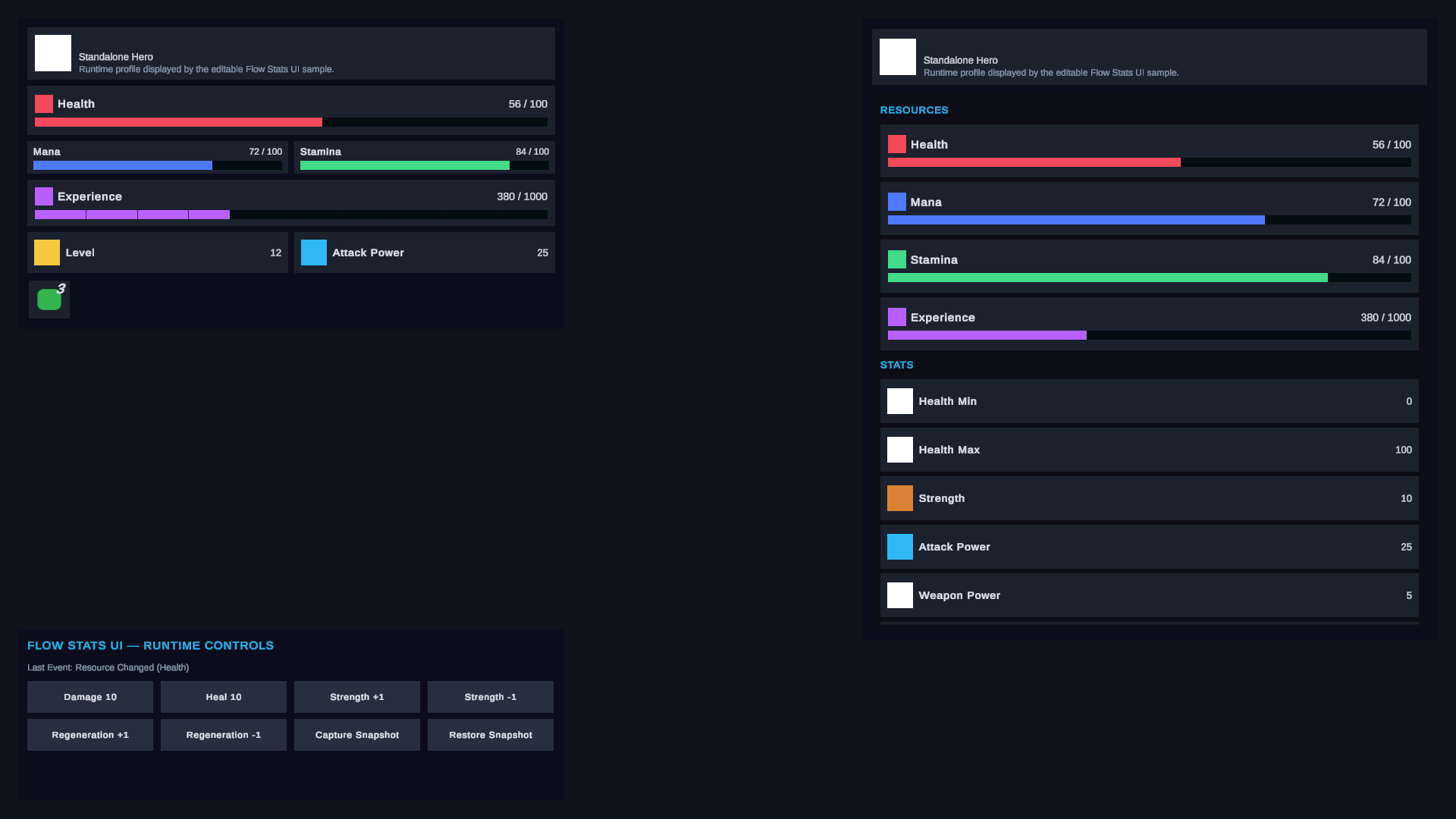
Steps
1. Create Regeneration
Create Flow Core > Stats > Status Effect and name it Regeneration.
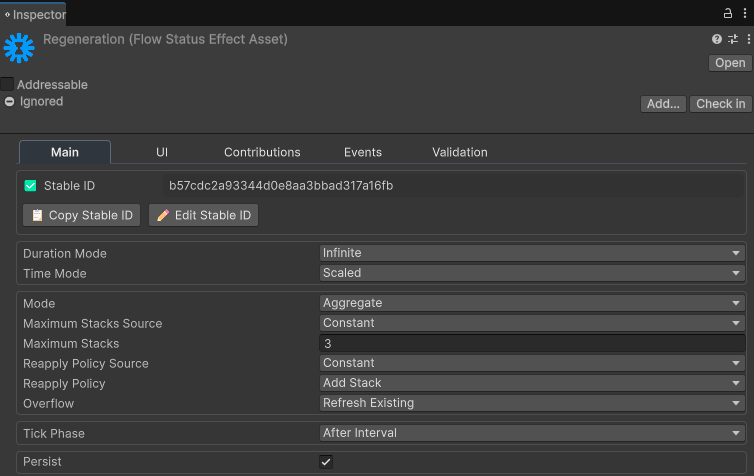
Choose Open Full Configuration in the Effect’s Inspector. In Main, use:
| Field | Value |
|---|---|
| Duration Mode | Infinite |
| Time Mode | Scaled |
| Mode, under Stacking | Aggregate |
| Maximum Stacks | 3 |
| Reapply | Add Stack |
| Tick Phase | After Interval |
After Interval waits for one complete interval before the first periodic contribution.
2. Add the periodic Resource contribution
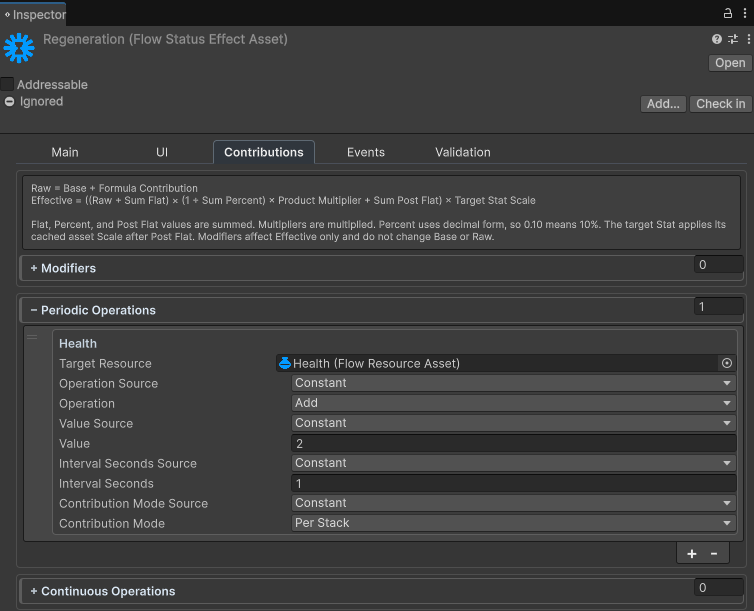
Open Contributions in the same window and add one periodic Resource operation:
| Field | Value |
|---|---|
| Target Resource | Health |
| Operation | Add |
| Value | 2 |
| Interval Seconds | 1 |
| Contribution Mode | Per Stack |
Per Stack multiplies the operation by the aggregate stack count. Three stacks therefore add 2 × 3 = 6 Health whenever the interval is due.
Leave Modifiers and Continuous Operations empty for this focused tutorial.
3. Permit and apply the Effect
Select the assigned Profile, choose Open Full Configuration, and open Effects.
- Leave Effect Filter Mode on
Nonefor this focused tutorial. This permits every compatible Status Effect, so no filter entry is required. - Add Regeneration to Initial Effects with Stack Count
3. - Validate the Profile.
- Enter Play Mode. On the
FlowStatscomponent, choose Open Full Configuration and inspect Debug > Live Runtime.
For a later runtime-driven version, remove the Initial Effect and apply Regeneration with Stats Apply Status Effect. If the Profile uses Whitelist, Regeneration must be in Allowed Effects. If it uses Blacklist, Regeneration must not be in Blocked Effects.
Verify the Result
Change Contribution Mode to Once and repeat the test. Each due operation should add two Health regardless of stack count. This confirms that stack ownership and contribution scaling are separate choices.
Common Mistakes
| Symptom | Check |
|---|---|
| The Effect is blocked | Check Effect Filter Mode. Whitelist needs an Allowed Effects entry; Blacklist must not contain Regeneration. |
| Health increases by only two | Confirm three stacks are active and Contribution Mode is Per Stack. |
| Health changes immediately | Use Tick Phase After Interval, not On Apply. |
| Health does not start at 50 | Confirm the cached range is 0–100 and Default Initial Normalized is 0.5. |
| Profile validation fails | Check missing assets, duplicate Stable IDs, invalid bounds, and contribution targets. |
| Editing the Effect changes no live values | Exit and re-enter Play Mode, or explicitly rebuild the runtime snapshot. |
What You Built
You created an infinite, aggregate Status Effect with three stacks and a native periodic Resource contribution. The Profile permits it through its Effect Filter and applies it as starting runtime data.
Next Steps
Remove Regeneration from Initial Effects and apply it from gameplay with Stats Apply Status Effect. Then surface Health and active Effects in a gameplay UI.