
Flow Stats
Build Your First Flow Stats Profile
Create a reusable Health configuration and give two FlowStats owners independent runtime values.
- Audience
- New Flow Stats users
- Time
- 15 minutes
- Requires
- A Unity scene with two test GameObjects
- Modules
- Flow Stats
On this page
Goal
Create one Profile containing a bounded Health Resource, assign it to two FlowStats components, and verify that shared authoring produces independent live state.
Prerequisites
- Basic familiarity with creating ScriptableObject assets and adding components.
- A scene with two empty GameObjects named
Player AandPlayer B.
What You Will Build
Both owners will reference one Profile. Player A will start at 60 Health. Player B will use an instance override and start at 25. Changing either runtime value will not change the other.
Steps
1. Create the Profile and Health definition
- Create
Flow Core > Stats > Profileand name itStandalone Stats Profile. - Create
Flow Core > Stats > Resourceand name itHealth. - Set Health Minimum to
0, Maximum to100, and Default Initial Normalized to0.6. - Select the Profile, choose Open Full Configuration, and add Health in its Resources module.
- Open Validation and validate the Profile.
Normalized 0.6 maps through the cached 0–100 range, so the default starting Current value is 60.
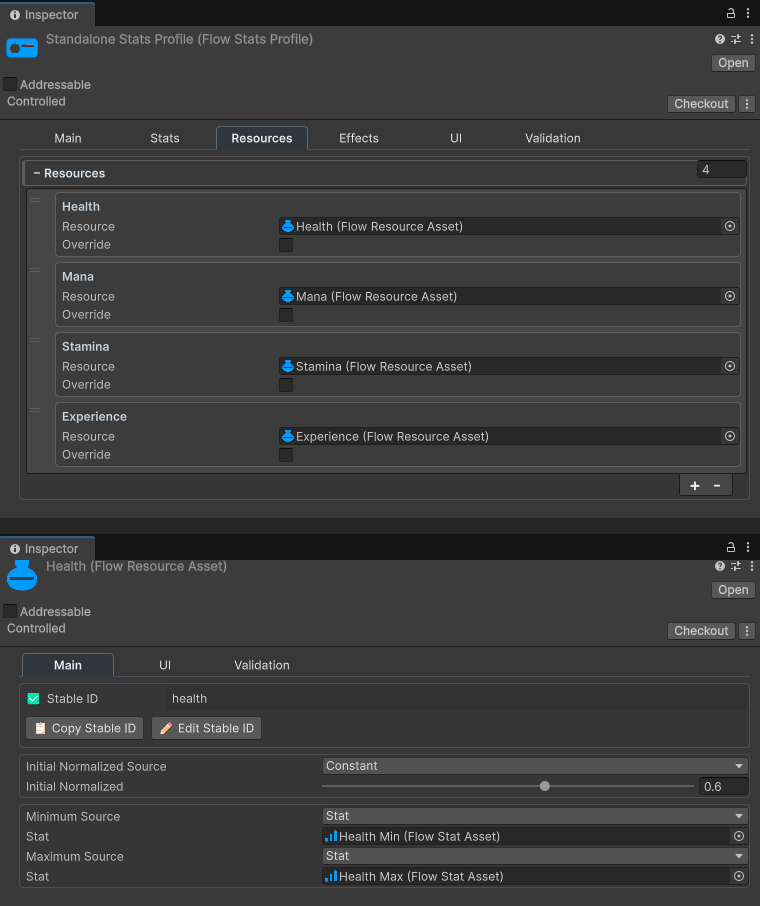
The screenshot shows the shipped sample Profile’s Resources module, including its additional Resources and Stat-bound Health limits. The five steps above are the minimum setup required for this walkthrough.
2. Create two runtime owners
Add Flow Core > Stats > Flow Stats to Player A and Player B. On each component, choose Open Full Configuration and assign Standalone Stats Profile in Main.
The Profile and Resource assets are shared authoring data. Each component will create its own runtime snapshot when it initializes.
3. Override Player B’s starting Health
In Player B’s Flow Configuration window, open Overrides and expand Resources.
- Find Health.
- Enable
Override Profile Value. - Set
Initial Normalizedto0.25.
Leave Player A unchanged so it continues to use the Profile value of 0.6.
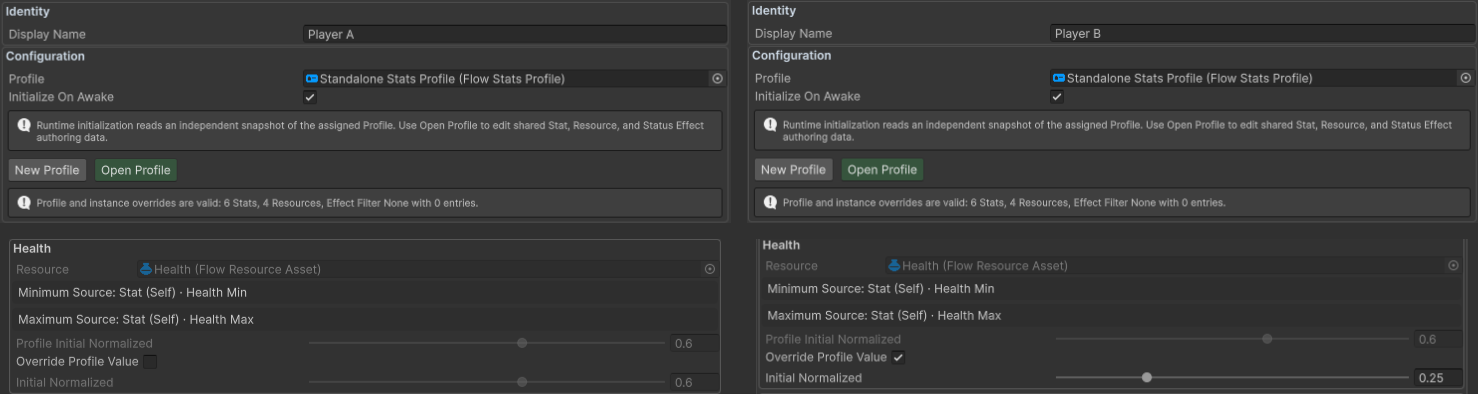
4. Inspect the live values
Enter Play Mode and open Debug > Live Runtime in each component’s Flow Configuration window. Player A should show Health 60 / 100; Player B should show 25 / 100.
Use a supported Resource mutation from a graph or C# to change one owner. The other owner’s Health must remain unchanged.
Verify the Result
Common Mistakes
| Symptom | Check |
|---|---|
| Both owners start at 60 | Confirm Override Profile Value is enabled and Initial Normalized is 0.25. |
| Both owners change together | Resolve and mutate a specific FlowStats component, not an authoring asset. |
| Health starts at zero | Check the bounds and initial normalized value, then validate the Profile. |
| A Play Mode asset edit has no effect | Exit and re-enter Play Mode, or explicitly rebuild the runtime snapshot. |
| Profile validation fails | Check missing definitions, duplicate Stable IDs, and invalid Resource bounds. |
What You Built
You created one reusable Profile, one bounded Resource definition, and two independent runtime owners. The instance override changed only Player B’s starting data; it did not duplicate the Profile.
Next Steps
Add Strength, Weapon Power, and a calculated Attack Power Stat to the same Profile.