
Integration
Integrating Third-Party Systems
Bridge external data and events through stable Flow Core boundaries.
- Audience
- Integration developers
- Time
- 20 minutes
- Requires
- C# and ownership of the external integration layer
- Modules
- Flow Core, C#
On this page
Connect another package through typed data, events, or an explicit graph-selection boundary. The bridge translates ownership; it should not depend on generated internals or mutate graph topology at runtime.
Choose a bridge type
| External system owns | Flow Core receives | Use |
|---|---|---|
| Current state | Typed Blackboard values | Data bridge |
| A callback or request | Trigger signal or named Entry | Event bridge |
| Which graph variant applies | A supported graph asset wrapper | Graph-selection bridge |
Data bridge
Mirror a value only when the external system remains its source of truth:
using UnityEngine;
using TwoCatsCode.FlowCore;

public sealed class HealthFlowBridge : MonoBehaviour
{
    private static readonly BlackboardKey HealthKey = new("Health");

    [SerializeField] private Blackboard blackboard;

    public void PublishHealth(float currentHealth)
    {
        if (blackboard != null)
        {
            blackboard.Set(HealthKey, currentHealth);
        }
    }
}
Create the matching typed key and bind the Blackboard to any process that reads it. Avoid two-way synchronization unless one side has a documented conflict rule.
Event bridge
Translate a main-thread callback into a Flow event:
using UnityEngine;
using TwoCatsCode.FlowCore;

public sealed class QuestFlowBridge : MonoBehaviour
{
    private static readonly FlowEventKey QuestStarted = new("Quest.Started");

    public void OnQuestStarted(int questId)
    {
        FlowEventBus.Global.Publish(
            QuestStarted,
            new FlowTriggerPayload(questId),
            FlowSignalContext.None);
    }
}
Add a graph Trigger for the same event key and match the expected payload type. Unbind external callbacks when the bridge is disabled or disposed.
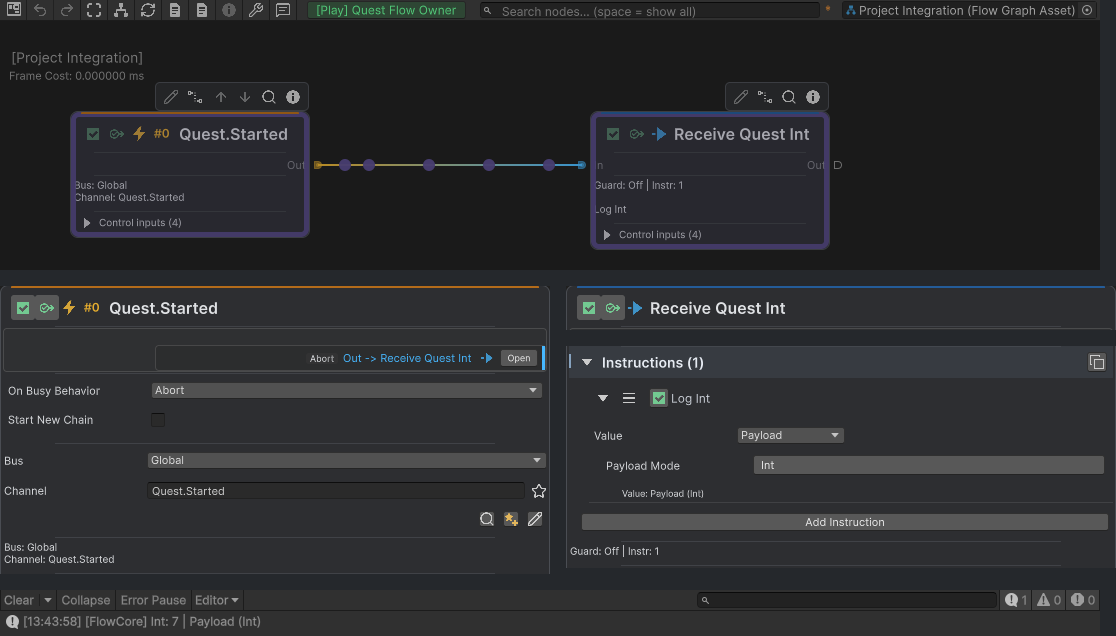
OnQuestStarted(7) produces the live Graph feedback above. Separate detail crops show Quest.Started on the Global bus and Log Int reading Payload Int; the native Console below records Int: 7.
Integration rules
- Keep one source of truth for each value.
- Initialize required data before the first relevant Trigger or Entry.
- Publish events and mutate runtime state on Unity’s main thread.
- Cache keys and references instead of parsing strings every frame.
- Avoid writing unchanged data in high-frequency bridges.
- Prevent feedback loops between external events and graph responses.
- Defer destructive cleanup when a callback would remove listeners or objects during the same dispatch.
Verify the bridge
Package the extension boundary
Keep supported source extensions and required helpers with their owning assembly. Flow Core 6.0 generates assembly-local bindings during compilation, so integrations do not share a central registry list. A precompiled DLL must include compatible provider bindings or a supported adapter; an arbitrary Editor-discoverable type is not proof of Player support.
Remove graph and C# references before deleting an integration. Validate availability and run the intended Player after import, removal, or a target-define change. Follow Automatic Registration & Prewarm.
Common Mistakes
| Symptom | Check |
|---|---|
| Graph reads an old value | Confirm bridge initialization and update order. |
| An event arrives twice | Check duplicate callback subscriptions and feedback loops. |
| Payload cannot resolve | Match the Trigger payload type and published value. |
| Behavior fails off the main thread | Marshal the external callback to Unity before calling Flow Core. |
| A shared graph leaks state | Keep mutable state in each process, Blackboard, or external owner. |
What You Built
You established a narrow translation layer in which the external package keeps ownership of its data or callback while Flow Core receives one typed value or event through a supported boundary.