
FSM
State-Driven Logic with FSM
Model persistent gameplay modes with explicit entry, active behavior, transitions, and exit.
- Audience
- Gameplay designers and developers
- Time
- 15 minutes
- Requires
- A Flow Graph and typed transition facts
- Modules
- FSM
On this page
Use FSM when one mode remains active over time and controls which behavior may run. The visible result should be an object entering a named state, performing its active behavior, and leaving through an intentional transition.
Mental model
An FsmState owns four phases:
- Enter establishes the state.
- Active behavior runs while the state remains selected.
- Transition checks decide whether another state should take ownership.
- Exit releases the current state before a direct transition completes.
Examples include Patrol, Alert, Combat, Dialogue, Stunned, and Dead. Use names that express gameplay identity rather than implementation details.
Author a state family
- Add one
FsmStatefor each persistent mode. - Give every state a stable, descriptive title.
- Give mutually exclusive states the same
Group ID. - Configure Enter and Exit behavior before adding complex active logic.
- Add typed transition Conditions, preferably from clearly owned Blackboard facts.
- Connect the path that activates the first state.
- Verify one complete transition in Play Mode.
Select a state to edit its Instructions and transitions in the Flow Inspector. Expand the transition and then the Condition you need to configure. Single Focus retains that ancestor path while closing unrelated entry bodies; use Continuous to compare Enter, Exit, or transition entries. The expansion choice does not activate a state or enable a transition. See Node Inspector & Entry Editing for the shared commands.
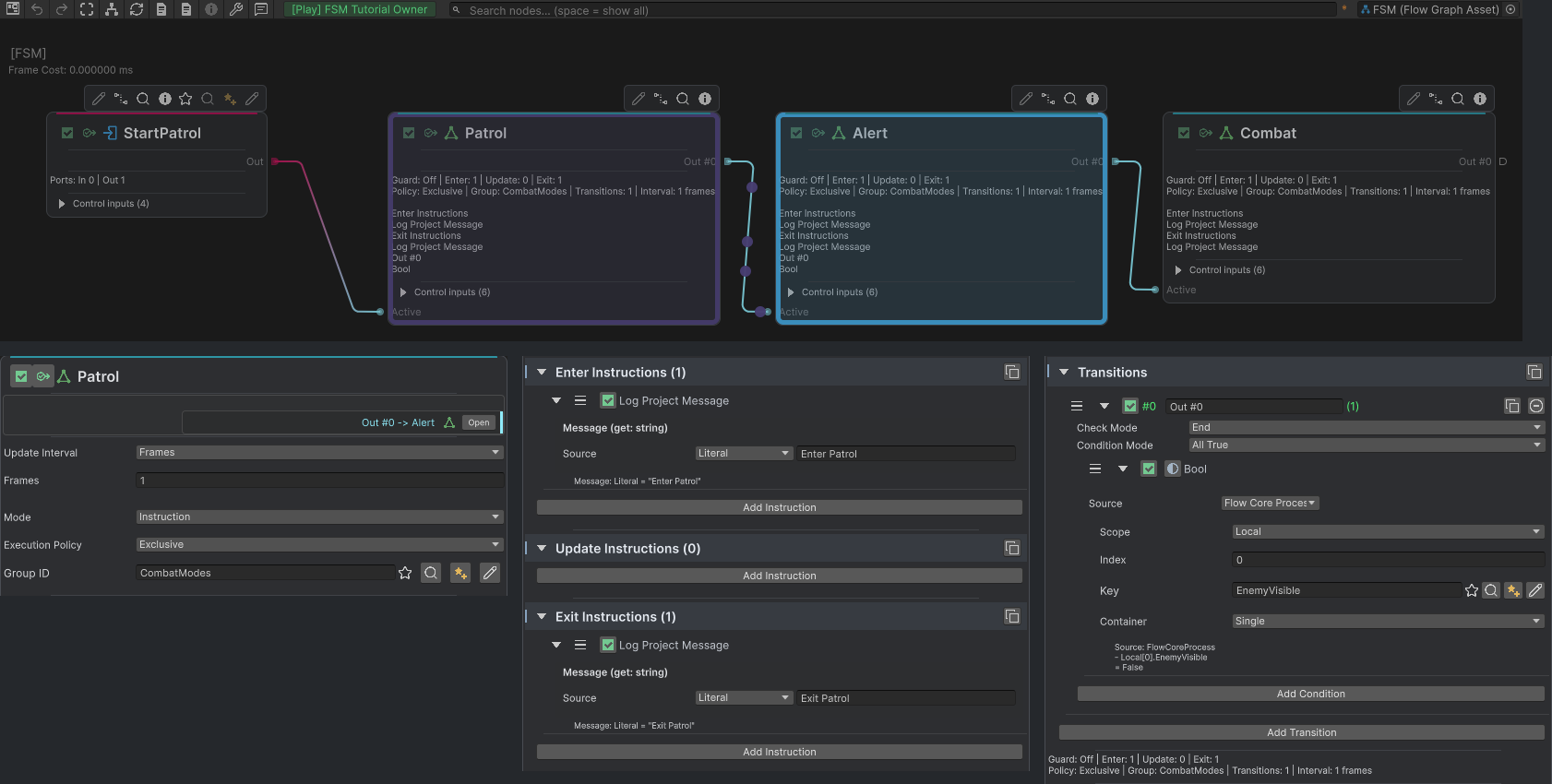
The runtime frame highlights Alert. Separate authoring crops below show Patrol’s Exclusive CombatModes group, complete Enter and Exit Instructions, and its EnemyVisible transition from Local Blackboard 0.
Exclusive and parallel policy
Use Exclusive when entering one state should request cancellation of other active states in the same group. Use different group IDs when independent state families may coexist, such as locomotion and upper-body intent.
Parallel changes entry-time preemption rules; it does not make one direct A-to-B transition overlap. On a direct transition, A’s Exit completes before B continues into Enter.
Keep state and decision responsibilities separate
FSM should answer “which mode is active?” It does not need to own every action inside that mode. A Combat state may activate a Behavior Tree for priority decisions and return to normal Flow for visible effects.
Use Blackboard facts such as EnemyVisible, IsStunned, or DialogueComplete to make transition ownership inspectable. Avoid transitions that depend on hidden side effects inside unrelated nodes.
Verify the behavior
Add temporary logs to Enter and Exit while establishing the lifecycle. Remove noisy diagnostics after visual debugging and the scene result are clear.
Common mistakes
| Symptom | Check |
|---|---|
| Unrelated states cancel each other | Give independent families different Group ID values. |
| A state never activates | Trace a normal Flow route into its activation boundary. |
| A transition fires unexpectedly | Inspect the Condition’s Blackboard scope, key, type, and update owner. |
| Exit work overlaps another independent state | Confirm whether both states were already active in separate parallel families. |
| The graph is difficult to reason about | Let FSM own mode and move priority choice or long side-effect sequences to their proper model. |