
Execution & Queries
Triggers, Entries & Payloads
Choose how a chain starts and what event data accompanies it.
- Audience
- Working with Flow Core
- Time
- 8 minutes
- Requires
- A Flow Graph and one activation event
- Modules
- Flow Core
Triggers and Entries both start execution chains, but they model different ownership. Use a Trigger when Flow Core listens for an event. Use an Entry when another caller explicitly requests a named graph behavior.
Trigger
A Trigger is an event-based start point. Trigger sources include Unity lifecycle, UI, input, Blackboard changes, signals, and module-specific events.
Examples:
- Unity
Startbegins initialization behavior. - A UI button click begins a confirmation sequence.
- A Blackboard value change begins a reaction.
- A Stats or Character event begins module-specific logic.
The Trigger may supply a payload describing the event. The available payload depends on the selected Trigger.
Entry
An Entry is a named graph start point, represented by an Enter node. Code, another graph path, or a supported runtime integration can execute it by identity or title.
Use an Entry when the caller already owns timing: a quest system requests QuestAccepted, a test calls RunValidation, or gameplay code calls SayHello.
Do not expect an Entry API to activate a Trigger. They are distinct start models.
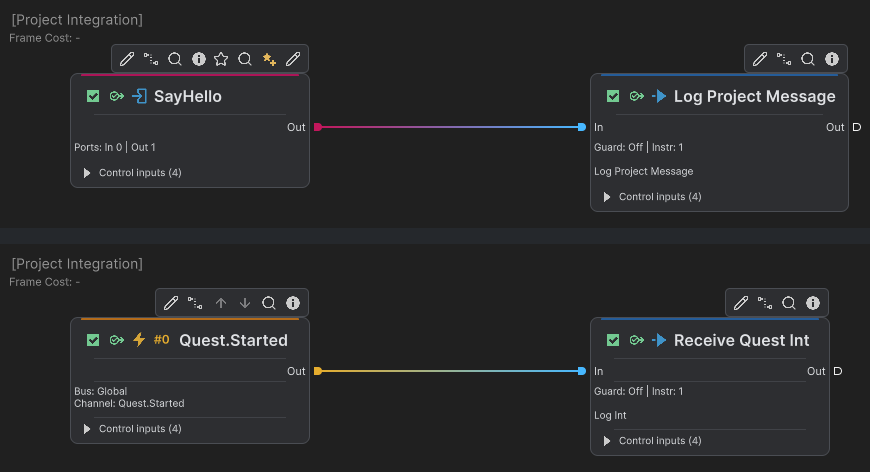
Separate Graph crops show SayHello calling Log Project Message above and Quest.Started receiving a Global event below. Each start connects directly to its own Action.
payload ownership
payload is data supplied when the chain starts. It belongs to that active chain and should be read as event context, not treated as a general storage location.
Typical payload data includes:
- the object that raised an event;
- a UI or input value;
- an interaction target;
- a module event snapshot;
- a caller-supplied value.
If later chains need the value, write the required typed result to an intentionally owned Blackboard key. If only later Instructions in the same chain need a derived value, use TempPayload.
Decision guide
| Situation | Start with | Data source |
|---|---|---|
| Unity lifecycle owns timing | Trigger | Trigger payload or Blackboard |
| UI or input event owns timing | Trigger | Event payload |
| Gameplay code owns timing | Entry | Caller context or Blackboard |
| Several listeners need a decoupled signal | Event Trigger | Published signal payload |
| A previous step computed temporary data | Existing chain | TempPayload |
Common misunderstandings
- A Trigger is not an Entry with a different icon.
- Renaming an Entry can break callers that use its title.
- A payload does not persist after the chain as shared state.
- Subgraph Triggers receive events only while their activation window is active; lifecycle events are not replayed later.