
Extension
Authoring Custom Instructions
Add a supported typed operation that designers can run inside an Action.
- Audience
- Unity developers
- Time
- 25 minutes
- Requires
- C#, Flow Core runtime assembly access, and codegen access
- Modules
- Flow Core, C#
On this page
Create a custom Instruction when Flow Core should perform a project-specific operation inside an Action list. Keep the runtime contract typed, explicit, and free of editor dependencies.
Define runtime data and behavior
The Instruction below resolves a typed string and logs it:
using System;
using System.Threading.Tasks;
using UnityEngine;
using TwoCatsCode.FlowCore;

[FlowInstruction("Log Project Message", "Project", "Log a typed string value.")]
public sealed class InstructionLogProjectMessage : IInstruction
{
    [Serializable]
    public sealed class Data : InstructionData
    {
        [Tooltip("Provides the string written to the Console when this Instruction executes. Select a literal or a typed context value; failed resolution does not write a message.")]
        public FlowValueGetStringData Message = new();

        public override InstructionData Clone()
        {
            return new Data
            {
                Message = Message?.Clone() as FlowValueGetStringData
                    ?? new FlowValueGetStringData()
            };
        }

        public override string Summary(FlowContext context)
        {
            return $"Message: {Message?.Summary(context)}";
        }
    }

    private readonly Data data;

    public InstructionLogProjectMessage(Data data)
    {
        this.data = data ?? new Data();
        this.data.Message ??= new FlowValueGetStringData();
    }

    public ValueTask<InstructionResult> ExecuteAsync(FlowContext context)
    {
        if (FlowValueResolveHelper.TryResolveValue(
                data.Message, context, out string value, out _))
        {
            Debug.Log(value);
        }

        return new ValueTask<InstructionResult>(InstructionResult.Continue);
    }

    public string Summary(FlowContext context) => string.Empty;
}
Preserve the contract
- Put the type in a runtime assembly.
- Keep serialized fields inside
Data. - Deep-clone nested Flow value data.
- Resolve typed values through the supplied
FlowContext. - Return an intentional
InstructionResult. - Keep editor UI code out of runtime assemblies.
- Avoid allocations and reflection in hot paths.
Control optional fields
Use FlowFieldAutoUI for simple authoring metadata. For example, optional prefix fields inside an Instruction’s Data can be declared as:
[Tooltip("Enables an optional prefix for the custom logging operation. Apply this choice explicitly when resolving the message at runtime.")]
public bool UsePrefix;

[Tooltip("Text to prepend when UsePrefix is enabled. Hiding this field preserves its value; clone it with the other Instruction data.")]
[FlowFieldAutoUI(Label = "Prefix", Show = "$UsePrefix")]
public string Prefix = string.Empty;
With reflection UI, changing UsePrefix immediately updates the Prefix field’s visibility. Hiding it preserves its value. The attribute controls drawing only: if you add these fields to the logging example, clone them in Clone and explicitly apply UsePrefix in the runtime operation.
The reflection fallback supports boolean members, nested member paths, an optional $ prefix, !, boolean and enum comparisons using == and !=, &&, ||, and parentheses. A nullable boolean (bool?) with a null value evaluates as false. It is not an arbitrary C# expression evaluator: method calls, arithmetic, and relational comparisons such as >= are unsupported. Keep property getters inexpensive and free of side effects.
An invalid condition leaves that field visible and reports a Console warning at most once per type, field, and condition combination per script load. Other valid Source, Target, and container rules still apply. Visibility is an authoring aid, not runtime validation.
Register and verify
- Import the supported runtime source and any required helpers. Flow Core 6.0 supplies its binding during compilation; no central registry-generation step is required.
- Wait for Unity to compile without errors, then check Validate Available Bindings in Registry Generator if the entry is missing.
- Add an Action to a test graph.
- Search for
Project > Log Project Messagein the Instruction picker. - Bind a literal and a Blackboard-backed string in separate tests.
- Enter Play Mode and confirm both resolve.
The package includes generated Drawers for its built-in types. Regenerate separately maintained Drawer implementations when their templates or field contracts change. Keep the existing output roots and review the generated diff; do not patch generated files by hand. In 6.0, compiler bindings replace the separate central registration-file maintenance. Handwritten custom Drawers keep responsibility for their own UI.
Reflection-only regions receive reflection behavior without regeneration. Use Generator only when you need implementation helpers; importing a supported source type is enough for automatic binding after compilation. Opening an editor or expanding an entry does not require Generator. See Automatic Registration & Prewarm for dependency, removal, and Player verification steps.
After registration, select the test Action in the Flow Inspector and expand Log Project Message. Use its More > Open Editor command to inspect the same data in a dedicated Instruction editor. Use Information to read the field metadata and Flow Knowledge to locate its reference. Keep the Tooltip useful to the author; reference metadata does not replace the runtime tests above.
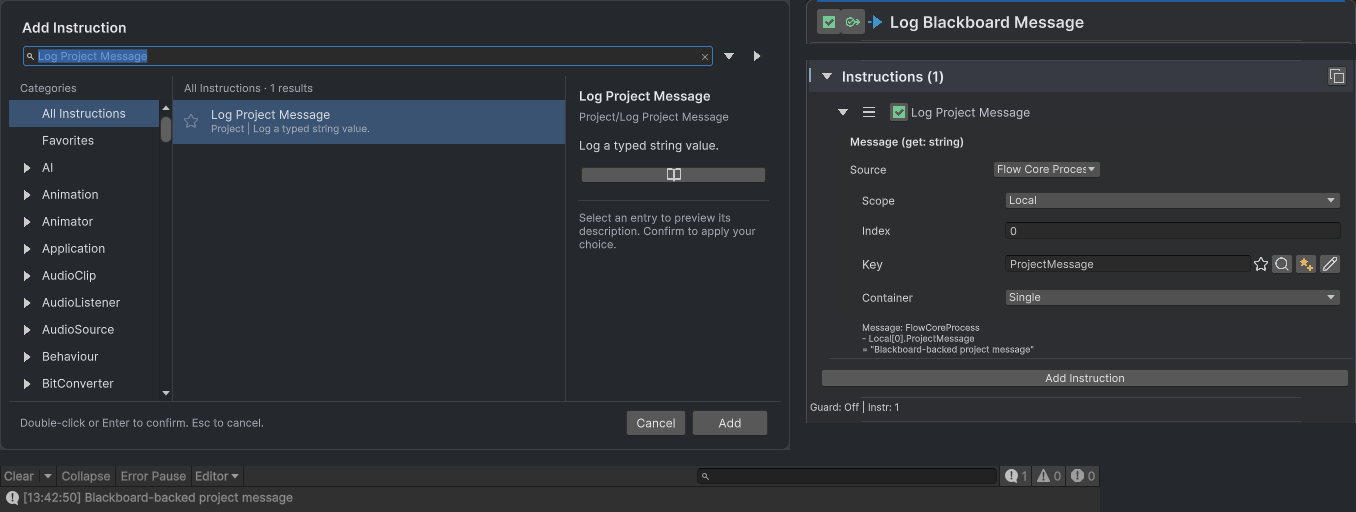
The picker identifies the registered Project Instruction. The cropped Action details bind Message to Local[0].ProjectMessage, and the Console message below shows the resolved string from the real LogBlackboard execution.
Common Mistakes
- Ignoring compiler/provider diagnostics or importing runtime code into an Editor-only assembly.
- Returning shared nested
DatafromClone. - Storing per-execution state on the shared graph asset or Instruction data.
- Adding UnityEditor references to the runtime assembly.
- Swallowing a failed value resolution while implying the operation succeeded.
- Using reflection in a frequently executed Instruction.
What You Built
You added a typed runtime operation that designers can place inside any Action, configure with literals or Blackboard values, serialize with a graph, and execute without editor-only dependencies.