
Debug and Maintain Projects
Troubleshooting
Start from an observable symptom and run the smallest relevant check.
- Audience
- All developers
- Time
- As needed
- Requires
- A reproducible symptom
- Modules
- Flow Core
On this page
Find the symptom closest to what you observe, run its first check, and apply the smallest matching fix. Use Debugging Running Graphs when the issue needs a complete trace.
Graph does not start
| Symptom | First check | Likely fix |
|---|---|---|
| Nothing happens in Play Mode | Inspect the scene FlowCoreProcess | Assign the intended graph and enable the process. |
| Unity Start never fires | Inspect Trigger bus and event | Use Unity bus with Start on the graph actually assigned to the object. |
| A C# Entry call returns false | Compare Entry title and process | Update the caller and confirm runtime initialization. |
| One object works and another does not | Compare process and Blackboard bindings | Bind each instance explicitly. |
Data is wrong or missing
| Symptom | First check | Likely fix |
|---|---|---|
| A value is empty or default | Inspect complete typed value source | Match scope, index, key, and type. |
| Scene data is inconsistent | Count Scene Blackboards | Bind the intended scene owner explicitly. |
| payload is unavailable | Inspect the start point | Use a Trigger or Entry context that actually supplies it. |
| TempPayload disappears | Inspect chain lifetime | Store longer-lived state in a Blackboard. |
Chain stops or repeats
| Symptom | First check | Likely fix |
|---|---|---|
| Start runs but the next node does not | Inspect connection and Guard | Connect the branch or correct rejection logic. |
| A repeated event seems ignored | Inspect Invoke Mode and active wait | Choose intentional busy behavior. |
| Work arrives late in a burst | Look for Queue on frequent events | Reduce event frequency or avoid queuing non-critical repeats. |
| A control route blocks execution | Inspect Pass Enabled | Restore pass or correct control ownership. |
Gameplay module symptoms
| Symptom | First check | Likely fix |
|---|---|---|
| Character moves without animation | Inspect active State and Animator | Enter a configured State and assign clips. |
| Camera Shot never wins | Compare Channel, Activated, and Priority | Match Channel and raise intended priority. |
| Interaction finds no candidates | Show Owner and Target ranges | Enable both objects and overlap valid radii. |
| Status Effect is ignored | Inspect Profile Effect Filter | Allow it in Whitelist or remove it from Blacklist. |
| GOAP reports No Plan | Inspect active Goal, facts, and root children | Add visible actions and satisfy a valid precondition route. |
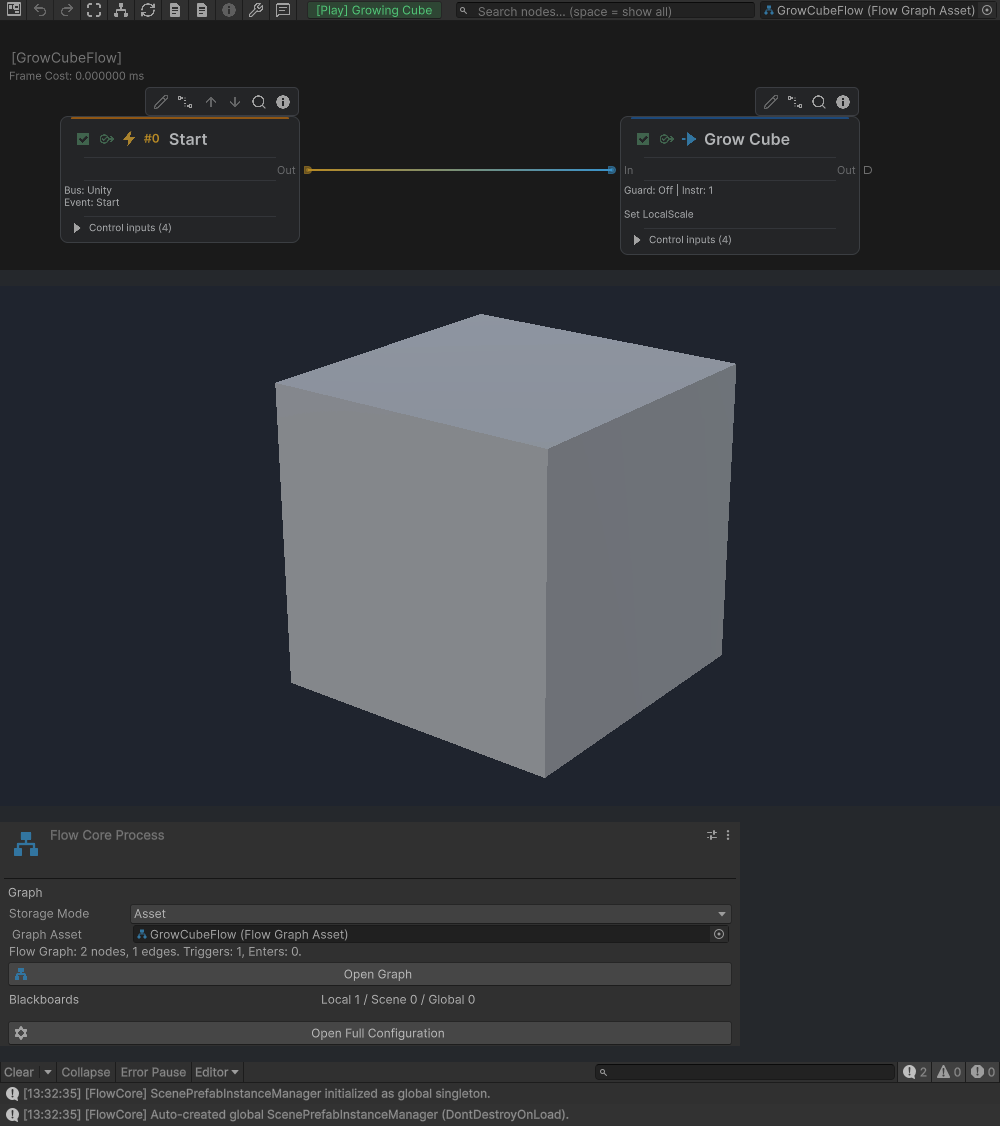
The Graph, Game view result, process binding, and Console identify the owner and route being inspected.
Editor and build symptoms
| Symptom | First check | Likely fix |
|---|---|---|
| Flow Inspector displays a different node | Read its title and pinned state | Unlock the pane to follow the current graph selection. |
| An entry closes when another opens | Check Entry Expansion Mode | Use Continuous for comparison, or keep Single Focus for one leaf path. |
| Every entry stays open | Check for the temporary expansion override | Choose Return to Entry Expansion Mode. |
| Rename, Information, or Open Editor is not inline | Open the entry’s More menu | Use the available command there; check read-only state for edits. |
| A documented field is absent | Check Source, Target, and conditional visibility | Select the intended value route; a hidden field may retain its stored value. |
Use Node Inspector & Entry Editing for the editing workflow and Field Information & Flow Knowledge for reference search.
- Missing menus usually indicate incomplete import or compilation failure.
- For empty Instruction or Condition pickers, resolve compilation errors, confirm the supported extension and its dependencies are imported, and run Validate Available Bindings. See Automatic Registration & Prewarm.
- Player-only failures often indicate editor dependencies inside runtime code.
- Broken summaries with correct runtime behavior often indicate an incorrect Debug Context.
Entering Play takes too long
Profile the reload and scene-integration phase separately from the first gameplay frames. Third-party initialization and Editor repaint can dominate before a frame-sliced queue runs. Follow Troubleshooting Slow Play Mode Entry for domain-reload checks and the measured Unity Visual Scripting case.