
Graph Authoring
Graph Assets & FlowCoreProcess
Separate reusable graph authoring from per-object runtime ownership.
- Audience
- All developers
- Time
- 7 minutes
- Requires
- A Flow Graph and a scene GameObject
- Modules
- Flow Core
On this page
Use a Flow Graph asset to author reusable behavior and FlowCoreProcess to run one instance of that behavior on a GameObject. Keeping these responsibilities separate prevents scene state from leaking into shared assets.
The ownership boundary
| Layer | Owns | Does not own |
|---|---|---|
| Flow Graph asset | Serialized nodes, ports, connections, comments, and settings | Per-object active chains or scene values |
FlowCoreProcess | Graph assignment, runtime lifecycle, Local Blackboard bindings, and public entry calls | Shared authored graph topology |
| Runtime instance | Executable nodes, active chains, payload, and current execution state | Project authoring data |
A graph can be assigned to several processes. Each process builds its own runtime, so one enemy can wait while another enemy using the same graph is already attacking.
Bind a graph to a scene object
- Create or select the GameObject that should own the behavior.
- Add
FlowCoreProcess. - Assign a Flow Graph.
- Choose Open Full Configuration > Blackboards on the process and bind any Local Blackboards the graph expects.
- Open the graph and set Debug Context to this GameObject.
- Enter Play Mode and activate one visible Trigger or Entry path.
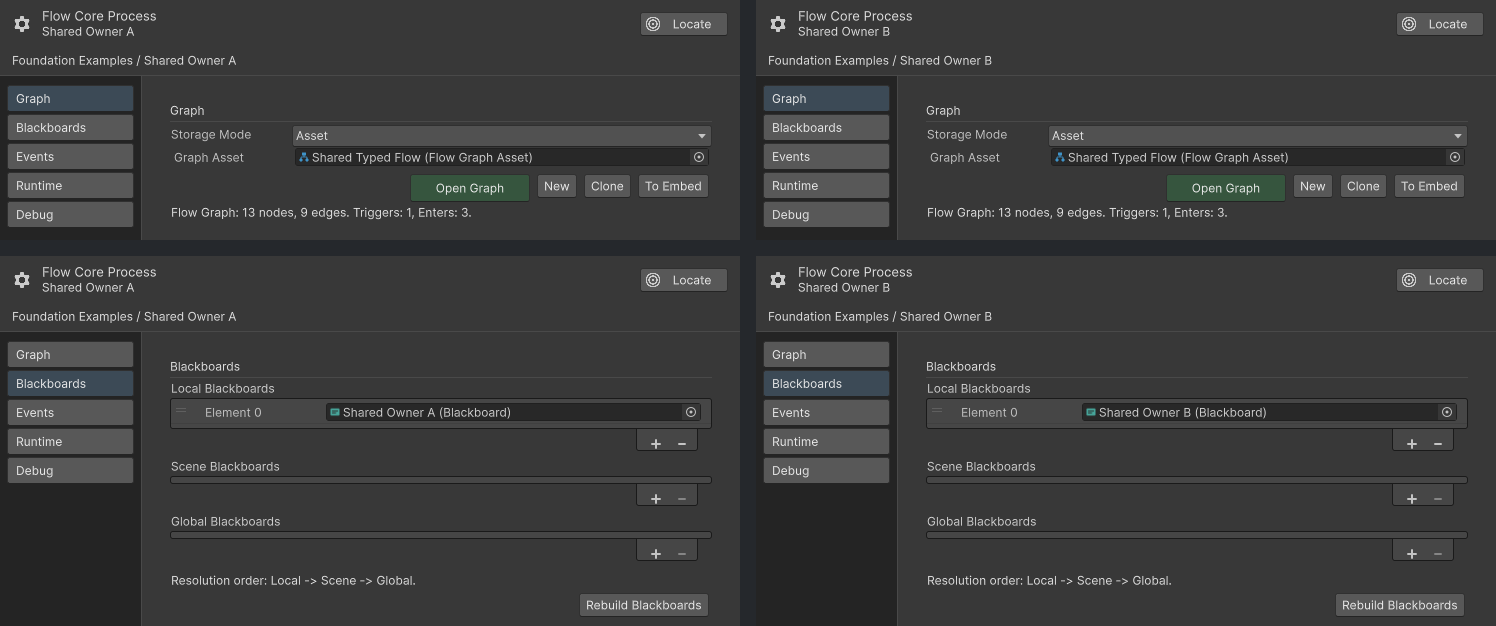
The two processes use the same Graph Asset and bind different Local Blackboards in Full Configuration.
Reuse without sharing state
Put data that varies by object in a Local Blackboard or another explicit runtime source. Avoid changing graph topology at runtime to represent object state. A shared graph should describe the stable behavior, while each process supplies its own context.
Good per-object values include target, health threshold, movement speed, and current mode. Good graph-level authoring includes the sequence, branch structure, node configuration, and supported module layout.
Runtime rebuilds
Use normal scene initialization for ordinary authoring. Runtime rebuild APIs are integration tools:
- Rebuild the runtime after intentionally replacing the graph source. Active chains are not preserved across that boundary.
- Rebuild Blackboard bindings after intentionally changing process Blackboard lists.
- Batch list edits, then rebuild once instead of rebuilding after every change.
Observable behavior
The binding is correct when:
- the Inspector shows the intended graph on the intended object;
- Local Blackboard indices match graph value paths;
- Debug Context can resolve summaries for that object;
- Play Mode shows the expected chain on that process only.
Common misunderstandings
- Editing a shared graph changes authored behavior for every object that uses it.
- Editing one object’s Blackboard does not change another object’s Local Blackboard.
- Debug Context chooses an editor inspection target; it does not transfer runtime ownership.
- A graph asset in the Project window has no Unity lifecycle until a runtime owner builds it.