
Flow Stats
React to Flow Stats Events
Enable one Stats event Trigger and turn a committed Resource change into visible feedback.
- Audience
- Gameplay designers and developers
- Time
- 15 minutes
- Requires
- The supplied 7. Stats example
- Modules
- Flow Stats
On this page
Goal
React to a committed Health change without polling every frame. Enable the component-owned Stats Resource Changed Trigger, filter its immutable Definition snapshot to Health, and log the committed Current value.
Prerequisites
- Import the Flow Core examples.
- Be able to enter Play Mode in the supplied
7. Statsscene. - Keep the Game view and Console visible for verification.
The supplied example keeps all standard Stats Triggers disabled. Work in a duplicate scene so this tutorial does not alter the shipped example.
What You Will Build
Damage 10
Health: 60 -> 50
Stats Resource Changed
Definition: Health
Current Current: 50
Steps
1. Prepare a safe scene copy
- Find and open the scene named
7. Stats. - Save a copy in a project-owned tutorial folder.
- In the Hierarchy, select
Standalone Stats Demo. - In its
Flow Statscomponent, choose Open Full Configuration, then open Events.
The event graph is embedded in this component. Editing the duplicated component leaves the original example unchanged.
2. Open the Stats event graph
- Keep
Storage Modeset toEmbed. - Select
Repair Standardsif the standard Stats Triggers are missing. - Select
Open Event Graph. - Find
Stats Resource Changedand enable that Trigger only.
Repair Standards restores standard Trigger identities, but it does not enable them. Disabled Triggers create no Stats event-graph work.
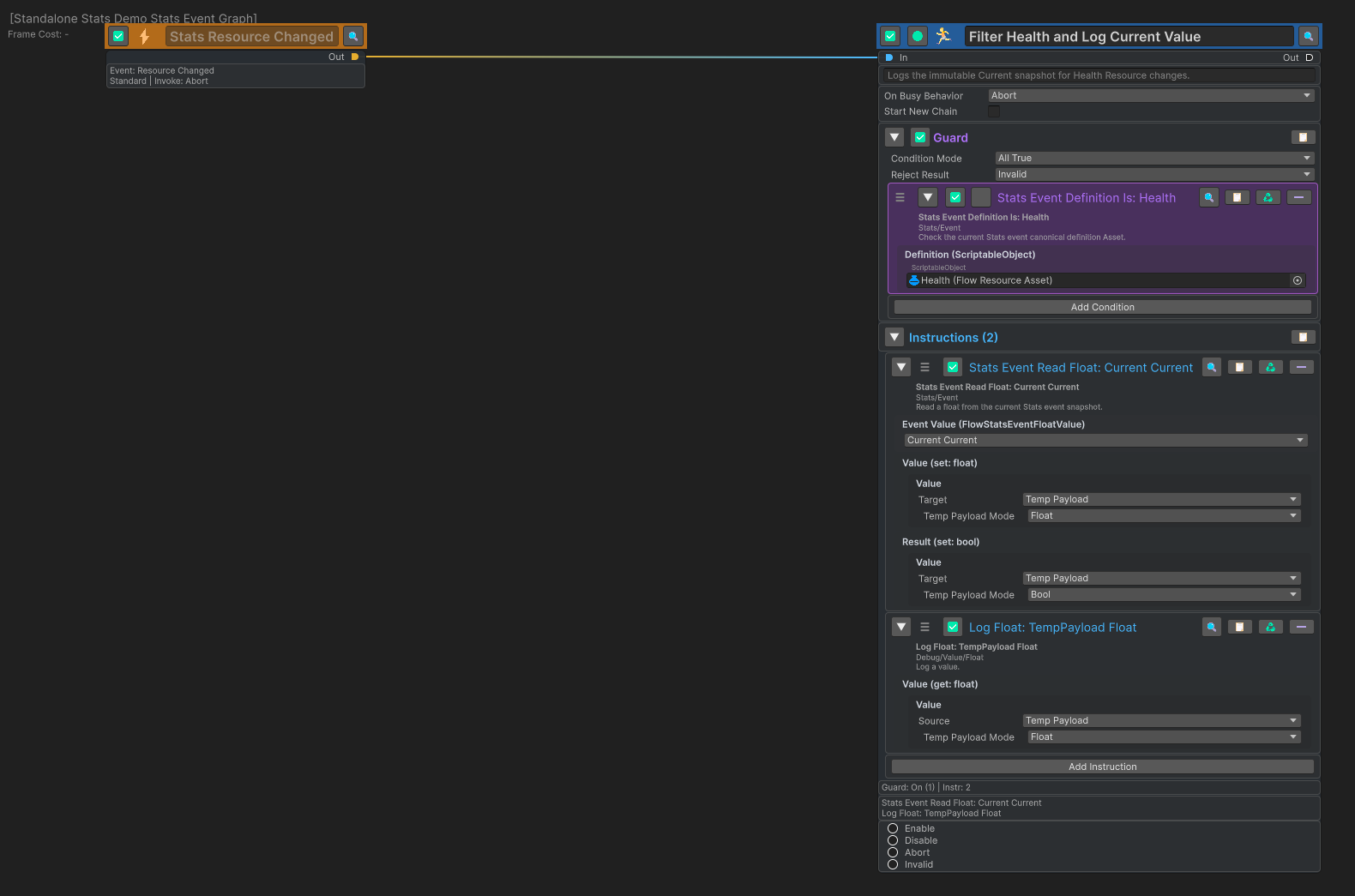
The Graph route is shown above the Action’s Guard and Instructions.
3. Filter Health and read the committed Current value
Connect Stats Resource Changed to an Action, then configure it in this order:
- Enable the Action Guard and add
Stats Event Definition Is. - Set its
Definitionto the suppliedHealthResource asset. - Add
Stats Event Read Floatand setEvent ValuetoCurrent Current. - Route
ValuetoTempPayload > Float. - Route the optional
ResulttoTempPayload > Bool; this tutorial does not read that channel later. - Add
Log Floatand readTempPayload > Float.
The Guard checks the canonical Definition asset carried by the event. Current Current then reads the committed Resource value from the immutable Current snapshot. TempPayload keeps both outputs local to the running chain, so this verification does not require a Blackboard or FlowCoreProcess.
For a production route that needs the Definition as data instead of a Guard, use Stats Event Read Definition and branch on the returned canonical asset before producing feedback.
Verify the Result
- Open the Game view and Console.
- Enter Play Mode.
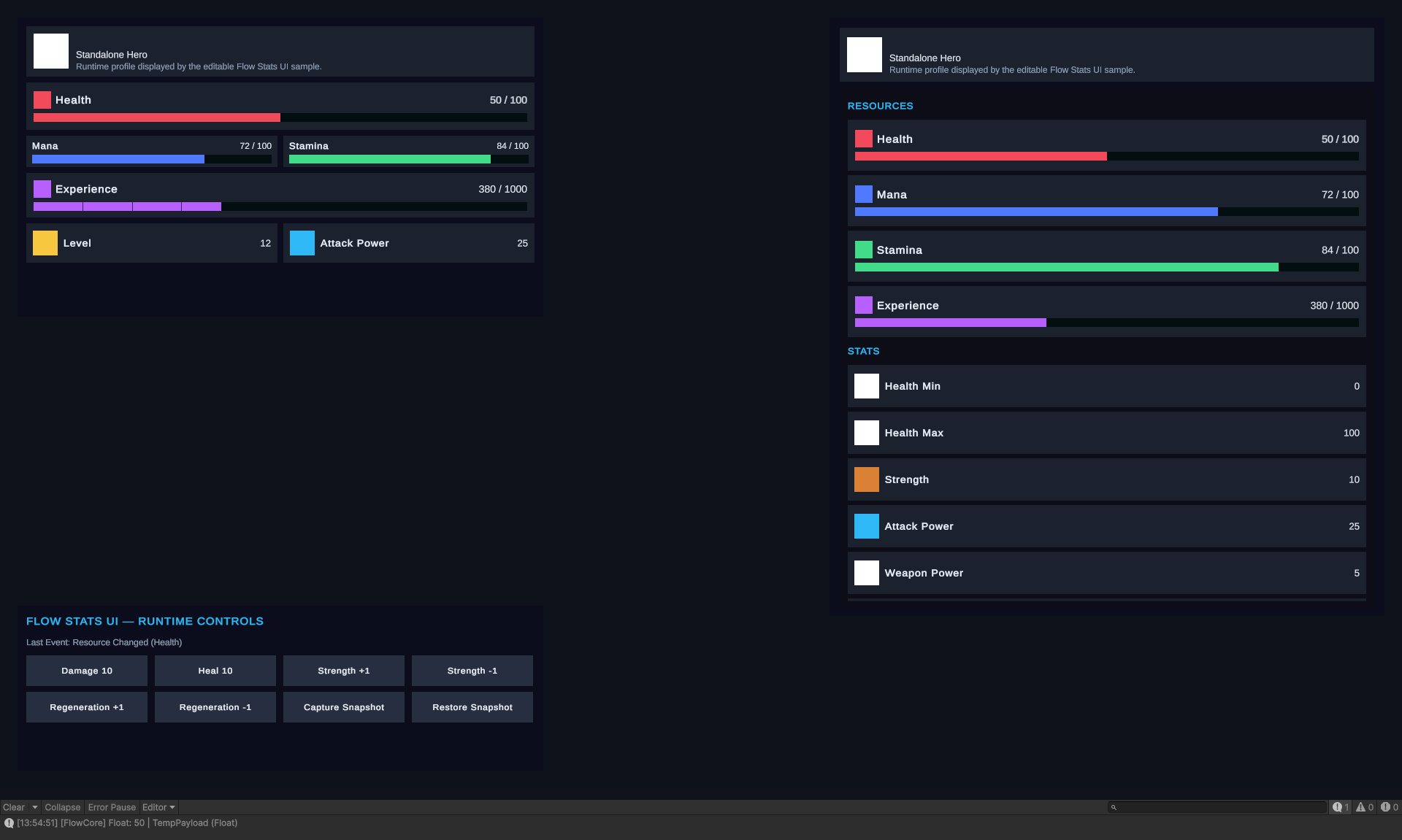
- Confirm that Health starts at
60 / 100. - Select
Damage 10once. - Confirm that Health becomes
50 / 100and the graph logs50.
The example’s Last Event label is updated by its sample C# controller. The Console value is the visible proof that the Event Graph route ran.
Common Mistakes
| Symptom | Check |
|---|---|
| The graph never starts | Select the Trigger and confirm it is enabled; Repair Standards alone does not enable it. |
| The wrong graph is open | In the component’s Events tab, confirm the active Storage Mode before selecting Open Event Graph. |
| Another Resource uses the same response | Confirm the Guard is enabled and Stats Event Definition Is references the exact canonical Resource asset. |
| A value looks different after a Wait | Read Previous, Current, or Delta from the immutable Stats event snapshot instead of querying later live state. |
| The sample label changes but the graph does not highlight | The sample controller also listens in C#; use the Console log and Graph Debug Context to verify the graph route. |
What You Built
You enabled one low-frequency Stats event route, filtered its canonical Definition, read a committed Current snapshot, and produced observable feedback without adding a per-frame graph or Blackboard dependency.