
Stack
Composing Logic with Stacks
Layer temporary modes and restore the previous mode with explicit push and pop lifecycle.
- Audience
- Gameplay and UI developers
- Time
- 12 minutes
- Requires
- A last-in, first-out mode requirement
- Modules
- Stack
Use Stack when a temporary layer covers the current mode and the previous mode must resume after the layer is removed. Typical uses include nested menus, dialogue input, inspect mode, and tutorial overlays.
Mental model
Stack Root owns the ordered collection. Stack Layer is the item that can be pushed.
Only the top layer receives Update. A layer below it remains paused until every layer above it is popped.
| Lifecycle output | Meaning |
|---|---|
| Push | The layer is added to the stack. |
| Resume | The layer becomes the active top layer. |
| Update | The current top layer receives its configured update. |
| Pause | The layer stops being top. |
| Pop | The layer is removed. |
Build a UI stack
- Add a Stack Root and name it
UiStack. - Configure the root’s
Update Interruptpolicy. - Add Stack Layers named
Gameplay,PauseMenu, andOptions, then configure each layer’s update interval. - Set every layer’s Root Name to
UiStack. - Put show or enable work in Resume.
- Put hide or disable work in Pause.
- Put one-time setup and cleanup in Push and Pop.
- Enable unique layers when a screen must not be pushed twice.
Select a layer in the graph, then edit its lifecycle Instruction sections in the Flow Inspector or Node Editor. Single Focus keeps the active entry and its owning section open. Choose Continuous to compare Resume with Pause, or use Expand All Items temporarily and then Return to Entry Expansion Mode. These view choices do not push, pause, resume, or pop a runtime layer. See Node Inspector & Entry Editing.
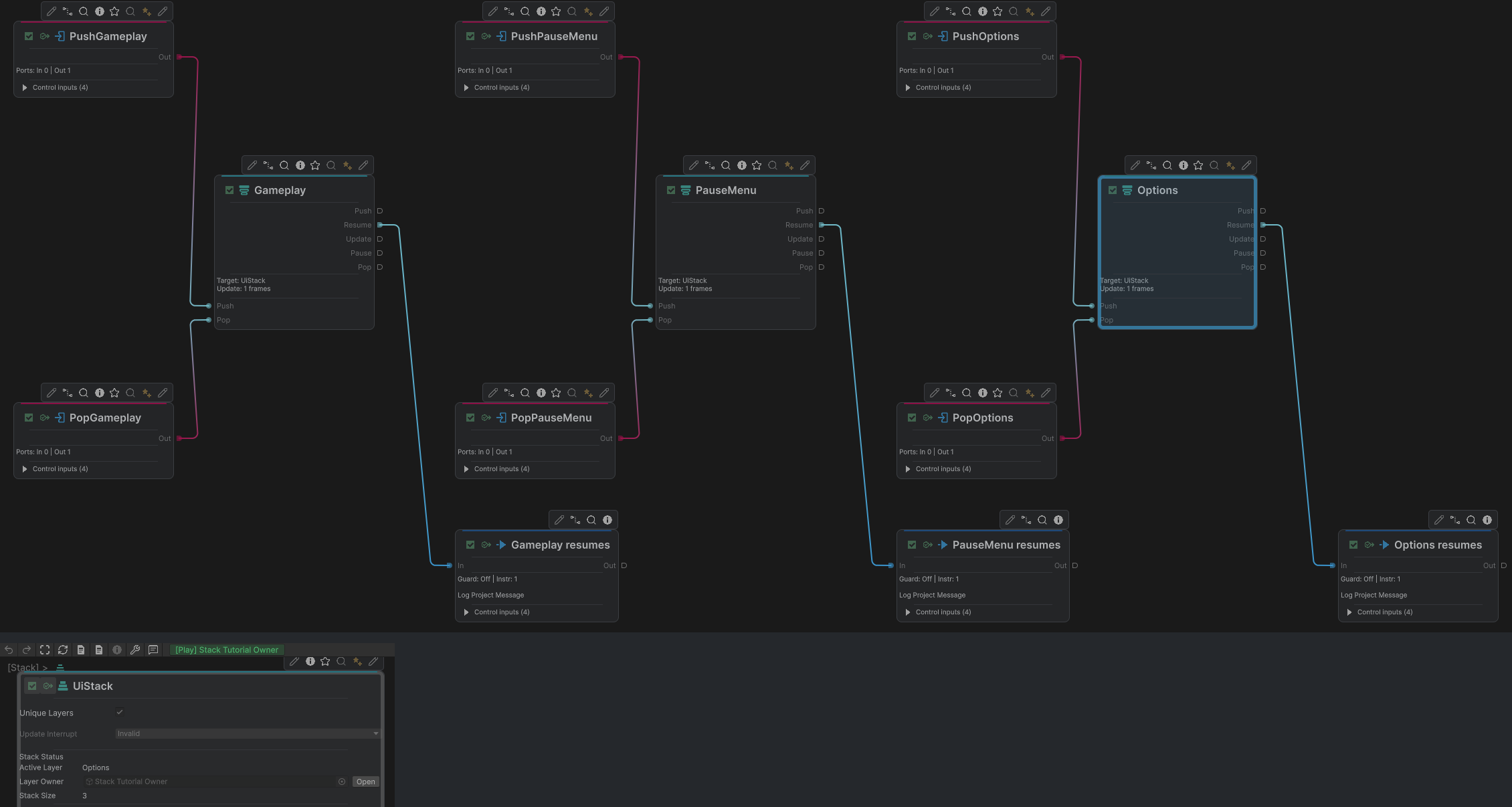
Gameplay, PauseMenu and Options appear left to right after being pushed in that order. The separate UiStack status crop below shows Options active and Stack Size 3. Every Layer exposes Push, Resume, Update, Pause and Pop ports; the shown Resume routes lead to visible log Actions.
Expected runtime order:
Gameplay active
Push PauseMenu -> Gameplay pauses, PauseMenu resumes
Push Options   -> PauseMenu pauses, Options resumes
Pop Options    -> Options exits, PauseMenu resumes
Pop PauseMenu  -> PauseMenu exits, Gameplay resumes
When Stack is not the owner
Do not use Stack when two systems should update concurrently. Independent movement and upper-body state families are better expressed as separate FSM groups or processes. Do not use Stack merely because several nodes form a list.
Root and layer names are runtime relationships. Keep them stable and add comments around cross-process pushes so target ownership remains visible.
Common mistakes
| Symptom | Check |
|---|---|
| A layer never joins the stack | Its Root Name must match the Stack Root title. |
| Lower layers keep updating | Confirm their work is connected to the layer Update lifecycle rather than a separate Trigger. |
| The same menu appears twice | Enable unique layers where duplicates are invalid. |
| Push waits unexpectedly | Check the root’s Update interruption mode and active Update work. |
| Two concurrent systems block each other | They should not share one last-in, first-out stack. |