
Behavior Tree
Hierarchical Behaviors with Behavior Trees
Build priority-oriented decisions that return explicit results to normal Flow.
- Audience
- AI designers and developers
- Time
- 15 minutes
- Requires
- A Flow Graph and decision facts
- Modules
- Behavior Tree
On this page
Use a Behavior Tree when the runtime must choose among prioritized or ordered behaviors as conditions change. Flow activates the tree; the tree owns selection; Success or Failure returns control to Flow.
Mental model
BTRoot is the entry boundary for a Behavior Tree branch. It owns the tree tick and exposes result routes back to normal Flow.
Inside the tree:
BtSelectorchooses the first child that can succeed.BtSequencerequires children to succeed in order.BTConditionperforms a pass/fail check.BTActionperforms leaf work.- Decorators modify child behavior.
- Services perform small periodic side tasks while the tree runs.
Child order is behavioral, not merely visual. Read children left to right according to the parent composite.
Author a decision tree
- Add
BTRootand connect normal Flow into its Active control input. - Add child outputs on the root.
- Choose a top-level Selector or Sequence.
- Add Conditions and Actions as leaves.
- Order children by intended priority or required sequence.
- Route root Success and Failure to visible Flow results.
- Enter Play Mode and change one decision fact.
Use the Flow Inspector to inspect the selected tree node’s child rows, Conditions, or Instructions. Keep the parent chain visible while expanding a nested entry; Single Focus retains the ancestors needed to edit it. Use the child list’s ordering controls when changing priority. Expanding a child is a presentation action; reordering or changing its Condition changes the authored decision. See Node Inspector & Entry Editing.
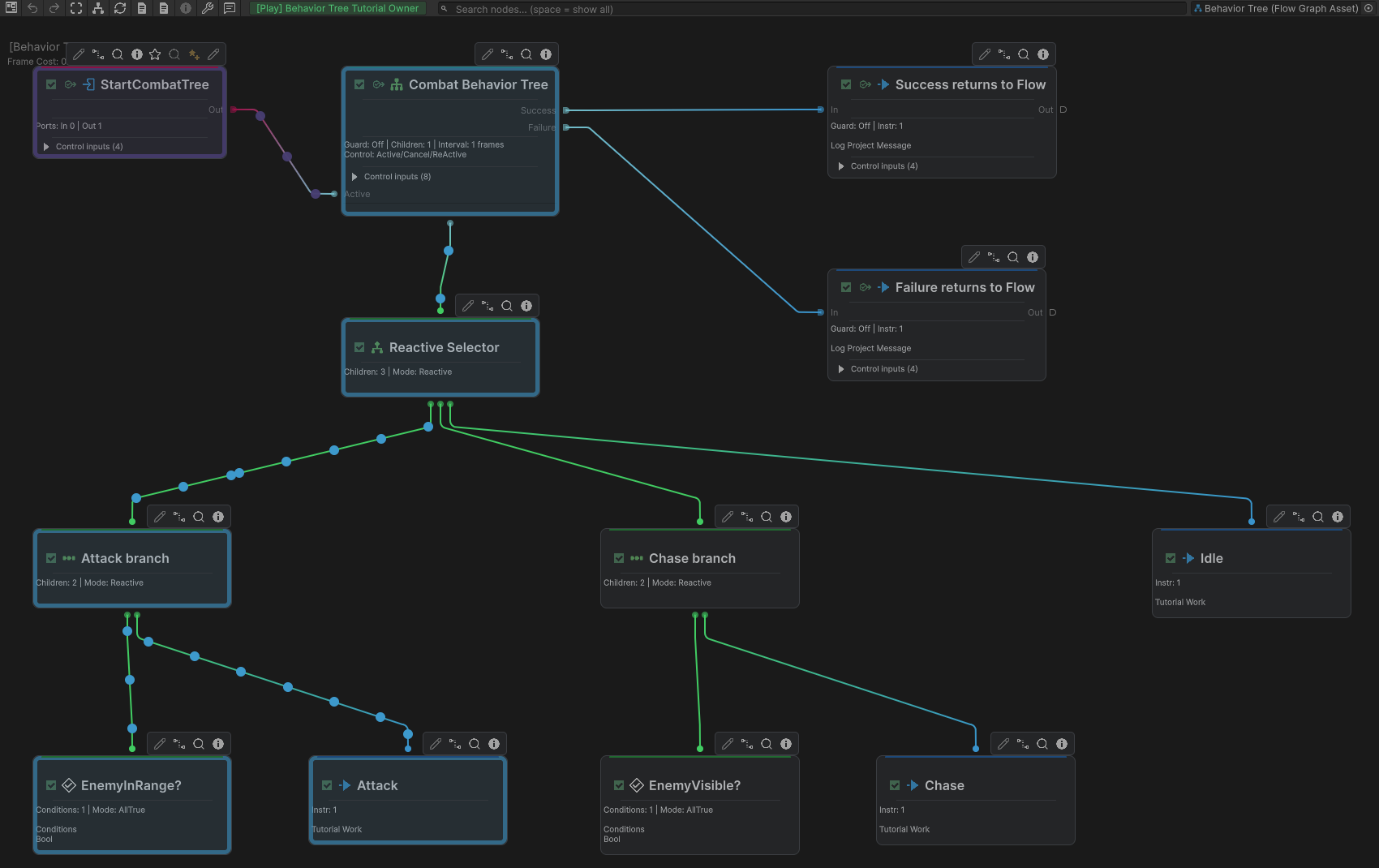
From left to right, Attack and Chase each check eligibility before their Action; Idle is the fallback. This runtime frame starts with Attack eligible. Success and Failure return to Flow. The image does not establish cancellation of earlier descendant Actions.
Reactive and memory behavior
A Reactive composite reevaluates from its first child and can select a higher-priority eligible branch when facts change. A Memory composite continues from its running child until that child finishes.
In this example, the Selector checks an Attack Sequence (EnemyInRange Condition, then Attack Action), a Chase Sequence (EnemyVisible Condition, then Chase Action), and finally Idle. Changing the facts can select Idle, then Chase, then Attack.
Use Reactive behavior when eligibility must be reevaluated. Use Memory behavior when a selected sequence should continue. Keep long-running consequences on explicit Flow routes when their interruption behavior matters.
Split decisions from consequences
Keep the tree focused on choosing intent. Long animation, camera, audio, UI, and multi-system timelines are often clearer after the tree returns a result to normal Flow.
For example, the tree selects Attack and writes or routes that intent. Flow then plays the Gesture, waits for a Marker, applies damage, and triggers feedback.
Common mistakes
- Adding a root without connecting Flow into Active.
- Treating canvas position as decoration when child order controls behavior.
- Expecting a
BTActionto replace a Condition for gameplay eligibility. - Using Reactive reevaluation for work that must finish uninterrupted.
- Leaving root result outputs without a defined handoff.
- Putting the entire visible gameplay timeline inside decision leaves.