
Extension
Automatic Registration & Prewarm
Import independent extensions, choose a preparation policy, and verify bindings without maintaining central registration lists.
- Audience
- Extension and integration developers
- Time
- 15 minutes
- Requires
- Flow Core 6.0 or later
- Modules
- Flow Core
On this page
Import a supported extension, let Unity compile, and verify that Flow Core can use it. In 6.0, normal compilation supplies assembly-local bindings. You do not maintain a central registration list or run Generator merely to make a supported source type available.
When to use this
Follow this workflow when sharing Instructions, Conditions, Drawers, Enums, or Blackboard types, or when choosing how much registration support to prepare before gameplay. Keep the extension’s implementation, required helpers, and assembly dependencies together.
What happens after compilation
The compiler supplies bindings with the assembly that owns the supported extension. The Editor maintains its registration directory in memory. This process does not repeatedly write a central registry C# asset and trigger another compilation.
The directory describes what is available. A binding becomes ready when its registration support has been prepared. First use and background prewarm share that state, so a prepared binding is reused rather than registered again.
Player builds include the target’s compiled bindings. They do not scan every loaded assembly for extension types at startup. Editor-only Drawers and descriptors stay in Editor assemblies.
Import, verify, and remove an extension
- Import the supported source file or group, including required Data, serializer, Drawer, and assembly dependencies. Use a runtime assembly for runtime code and an Editor assembly for authoring UI.
- Allow Unity to finish importing and compiling. Resolve compiler errors before inspecting registration.
- Open
Edit > Project Settings > Flow Core > Tools > Registry Generator. - In Registration Directory, confirm compiler bindings are enabled. Run Validate Available Bindings to check IDs, provider slots, conflicts, and lookup failures. Validation is frame-sliced and does not activate every binding.
- Find the new Instruction or Condition in its picker, construct its Drawer, or exercise the typed Enum/Blackboard path. Test both Editor and the intended Player target.
- To remove it, first remove or replace references in your own C# and graph assets, then delete its files and allow Unity to compile again.
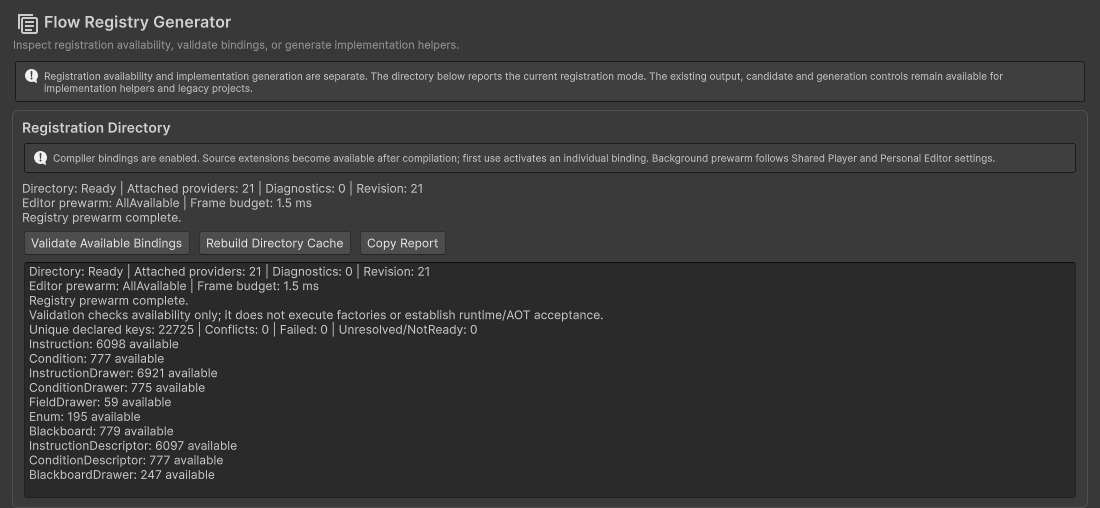
Registration Directory separates availability and validation from implementation generation. The displayed counts describe this project, not a required package size.
Removing a source extension does not leave its name in a generated central C# list. It can still leave missing content in graphs that used it, or compile errors in your own code that references it. Resolve those references rather than recreating an empty compatibility class.
For a precompiled third-party DLL, confirm it includes compatible Flow Core provider bindings or a supported integration adapter. An arbitrary DLL does not gain automatic Player bindings merely because the Editor can load its types. Assembly visibility, target defines, required helpers, and stable IDs still matter.
Choose when bindings become ready
| Mode | Background work | Choose it when |
|---|---|---|
| All Available (default) | Prepares configured priority targets and dependencies first, then remaining available bindings. | Startup or a main menu gives you time to prepare later gameplay. |
| Specified | Prepares configured Graphs, modules, entries, and their required binding dependencies. | You want a smaller prepared scope and know the upcoming content. |
| On Demand | Does not automatically prepare the remaining directory. Bindings are prepared when used or explicitly requested. | You prefer minimal background work and accept possible first-use cost. |
All modes retain availability. If a required binding is not ready, first use prepares that target and its dependencies synchronously, including while background prewarm is paused. A large cold operation can therefore cause a hitch; prioritizing upcoming content during a menu can reduce that risk.
Configure Editor and Player separately
Open Personal > Diagnostics > Registration for Editor prewarm. These preferences belong to the current user and project location. The default soft budget is 1.5 ms per Editor update.
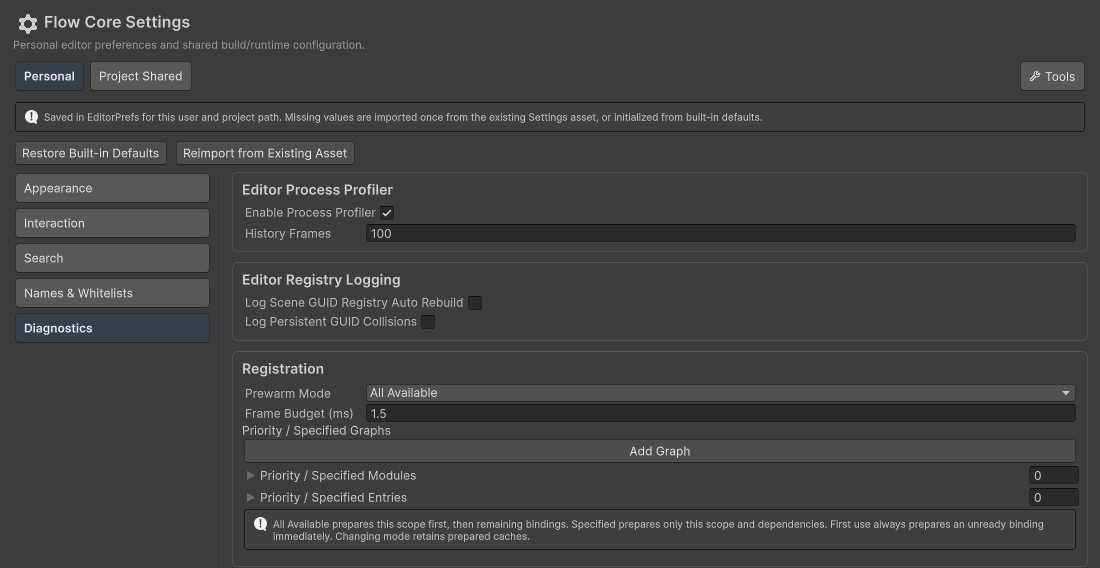
Personal configures preparation in the Editor without changing the team’s shared runtime settings.
Open Project Shared > Runtime > Registration for Player policy. The default soft budget is 0.25 ms per Player frame. Review these settings through version control because they affect the team’s builds.
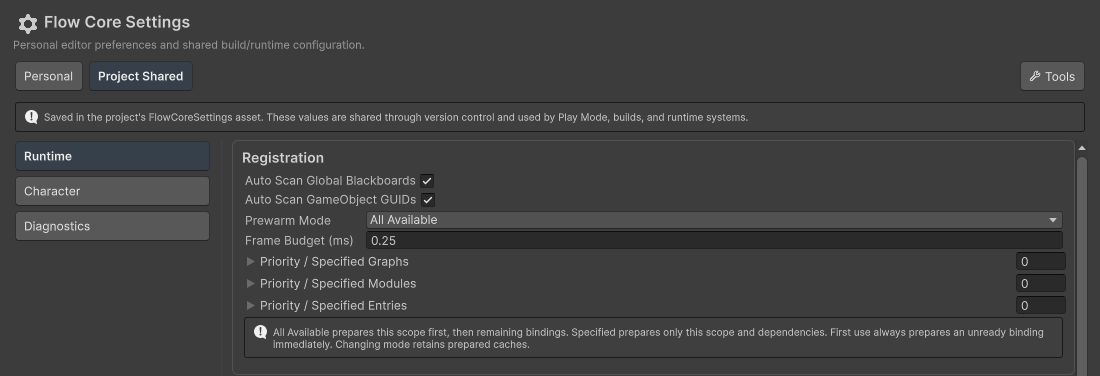
Project Shared configures Player preparation. Scene-object discovery options in the same section are separate from extension-type registration.
Use Priority / Specified Graphs, Modules, and Entries to identify upcoming work. All Available processes this scope first; Specified uses it as its background scope. Entries use their registration category and stable ID; modules use the provider’s exact, case-sensitive module name. A Graph selects registration dependencies, not a request to instantiate and run the Graph.
Understand the budget and memory tradeoff
Prewarm runs on the main thread over multiple updates or frames. The budget is soft: one binding, its dependencies, or first-time code initialization can exceed it. Prewarm prepares registration support; it does not construct gameplay instances, build all Drawer UI trees, load complete gameplay resources, or execute Graphs.
All Available can retain more prepared caches. Specified and On Demand can leave unused bindings cold, but switching policy does not unload caches already prepared in the current session. Measure your actual startup and memory profile before choosing a narrower scope.
Generator and troubleshooting
Use Generator when you need to create or update implementation helpers such as member wrappers, Drawers, Enum resolvers, or serializers. Automatic binding does not write a missing implementation for you. Do not hand-edit generated implementations.
Rebuild Directory Cache refreshes Editor-owned automatic caches and restarts personal prewarm. It preserves explicit manual registrations and Player activation state; it does not repair compiler errors or rewrite graph references. An explicit manual registration retains precedence over automatic defaults. Resolve duplicate automatic IDs and missing dependencies reported by validation.
Verify the result
Confirm the extension appears after compilation, works on first use before background preparation completes, and remains usable after entering Play with domain reload both enabled and disabled. Build and run the intended Player; Editor availability alone does not establish IL2CPP compatibility.