
Integration
Running Graphs from C#
Call a named Flow Core Entry through the supported FlowCoreProcess runtime API.
- Audience
- Unity developers
- Time
- 15 minutes
- Requires
- C# and a graph bound to FlowCoreProcess
- Modules
- Flow Core, C#
On this page
Call a named Entry when another Unity system already owns the activation moment. This is the supported bridge from gameplay code into authored graph behavior.
Create the graph Entry
- Open the graph assigned to a scene
FlowCoreProcess. - Add an Enter node.
- Set its title to
SayHello. - Connect it to an Action with a visible result, such as a log or scene change.
- Set Debug Context to the scene object that owns the process.
Entry titles used by code are integration identity. Rename them together with their callers.
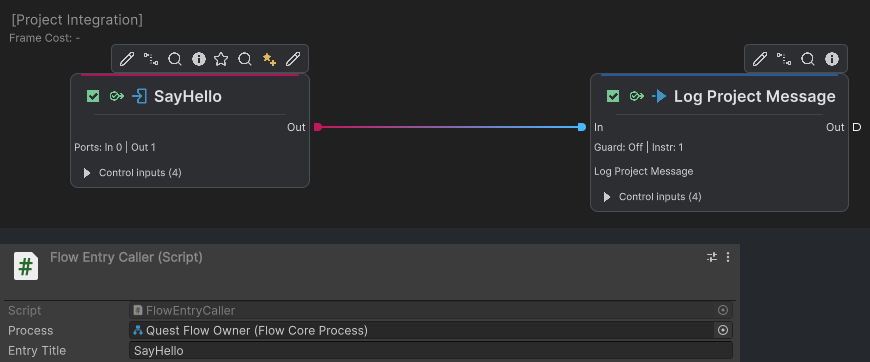
The native Graph and caller Inspector crops show the matching SayHello entry name and the caller’s Quest Flow Owner process binding.
Add a caller
Attach a MonoBehaviour like this to a scene object:
using UnityEngine;
using TwoCatsCode.FlowCore;

public sealed class FlowEntryCaller : MonoBehaviour
{
    [SerializeField] private FlowCoreProcess process;
    [SerializeField] private string entryTitle = "SayHello";

    public void Run()
    {
        if (process == null)
        {
            Debug.LogWarning("No FlowCoreProcess is assigned.", this);
            return;
        }

        if (!process.ExecuteEnterByTitle(entryTitle))
        {
            Debug.LogWarning(
                $"Flow Core Entry was not executed: {entryTitle}",
                this);
        }
    }
}
Assign the intended process in the Inspector, then call Run from the code or Unity event that owns timing.
Choose code or Trigger ownership
Use code-triggered Entry execution when a quest system, dialogue service, network layer, custom input system, test harness, or another component already decides when work begins.
Use a graph Trigger when activation is naturally authored inside Flow Core, such as Unity lifecycle, UI, input, Blackboard changes, or a Flow signal.
Do not call an Entry merely to imitate an available Trigger. Choose the boundary that makes activation ownership visible.
Pass data deliberately
For reusable configuration or state, bind typed Blackboard values before the Entry executes. For one-call event data, use a supported Entry context or signal payload when the API and graph path are designed for it.
Keep runtime calls on Unity’s main thread. If an external callback arrives on a worker thread, marshal the request before calling the process.
Verify the result
Common Mistakes
| Symptom | Check |
|---|---|
| The method returns false | Confirm the process runtime exists and the Entry title matches exactly. |
| Another object runs | Assign the intended FlowCoreProcess reference. |
| The Entry starts but data is wrong | Verify Blackboard scope, index, key, type, and binding before the call. |
| The call is intermittent | Confirm the caller runs on the main thread and after the process has initialized. |
| A Trigger was expected to run | ExecuteEnterByTitle calls an Entry, not a Trigger. |
What You Built
You created an explicit, supported boundary from a Unity component into an authored Flow Entry. The caller owns timing and target selection; the graph owns the visible behavior after SayHello begins.