
GOAP
Goal Planning with GOAP
Plan action sequences from boolean facts, preconditions, effects, priorities, and costs.
- Audience
- AI designers and developers
- Time
- 20 minutes
- Requires
- A Flow Graph and boolean world-state facts
- Modules
- GOAP
On this page
Use GOAP when an agent should discover a sequence of actions that can transform current world facts into a desired goal state. You author goals and possible actions; the planner selects a valid, low-cost route at runtime.
Planning model
GoapRootowns the planner and its available children.GoapGoaldescribes desired boolean facts and priority.GoapActiondescribes preconditions, effects, execution work, and cost.- Blackboard booleans represent the facts the planner reads.
Lower goal priority numbers are evaluated first. Lower action cost makes a valid action more attractive within the plan.
Author a small planner
Create an agent that wants EnemyDefeated = true:
- Add
GoapRootand title itCombatPlanner. - Add a normal Flow route that will activate the goal.
- Add
GoapGoaltitledDefeatEnemy. - Set its desired condition to
EnemyDefeated = true. - Add
GoapActiontitledMoveIntoRangewith the appropriate precondition and effectInRange = true. - Add
GoapActiontitledAttackwith preconditionInRange = trueand effectEnemyDefeated = true. - Set
Root Nameon the Goal and each Action toCombatPlannerso they register with that root by title. - Activate
DefeatEnemywithActivate GoapGoalfromFlow/GOAP.
Use the Flow Inspector or Node Editor to inspect each Goal’s and Action’s conditions, effects, and execution settings. Pin an Action when comparing it with another node and check the pane title before editing. Entry expansion changes what you can inspect; it does not change goal priority, action cost, Root Name registration, or the selected runtime plan. Use Information to clarify a field’s meaning. See Node Inspector & Entry Editing.
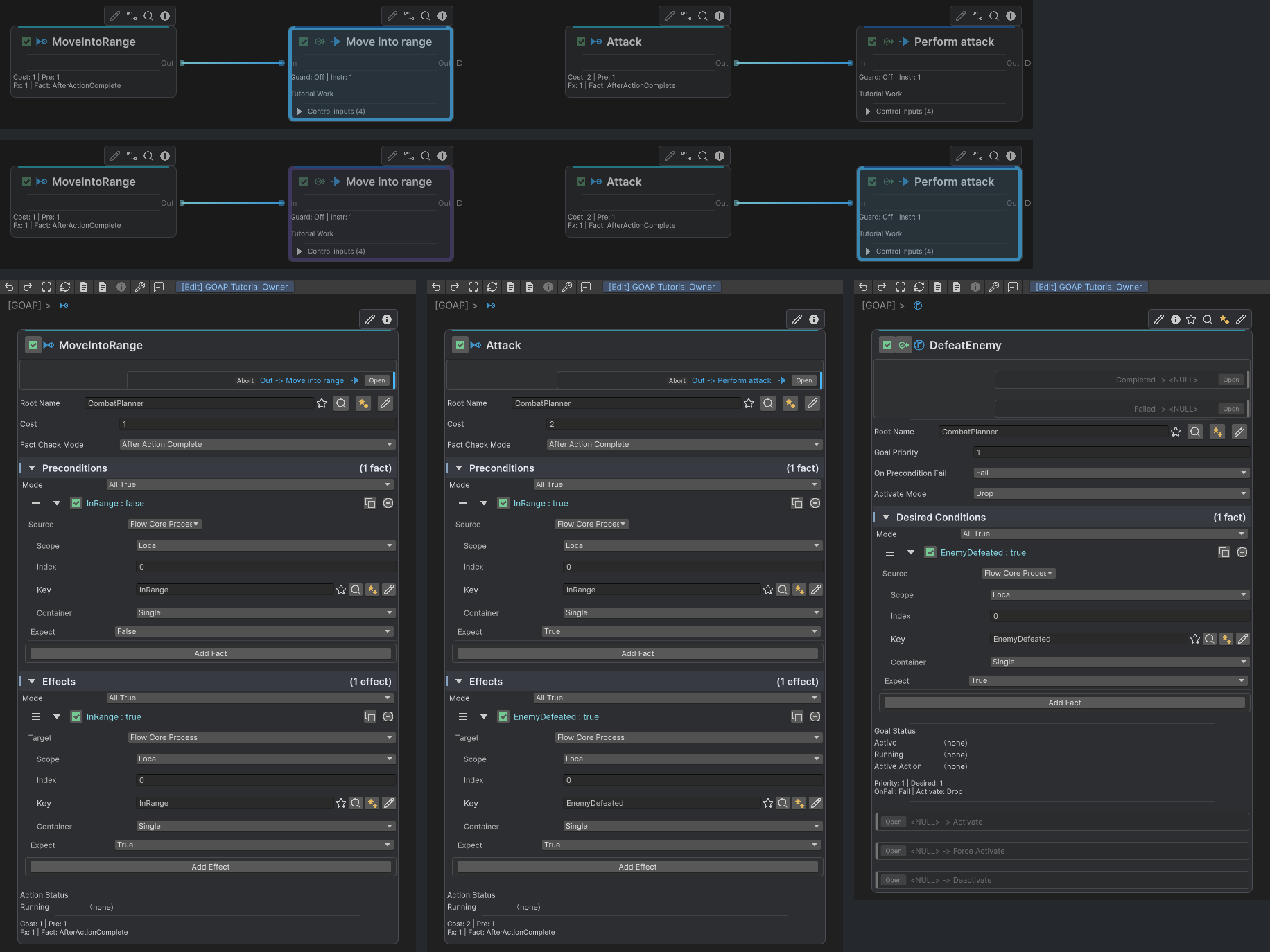
The upper action rows are separate runtime captures: Move into range is running first, then Perform attack. The authoring editors below show MoveIntoRange, Attack and DefeatEnemy registered with CombatPlanner by Root Name, together with their Costs, Preconditions, Effects and desired fact. Their Edit-mode status fields are not the runtime result.
Separate planned facts from real work
An action’s effects describe what becomes true when that action completes successfully. The action’s execution route must perform the real gameplay work: movement, animation, interaction, or combat.
Keep facts small and intentional. GOAP facts are boolean planning state, not a replacement for every numeric gameplay value. Derive facts such as InRange or HasAmmo from the systems that own those values.
Replanning
The planner checks preconditions as execution progresses. If relevant facts invalidate the active plan, it can replan from the new state. Use root status outputs such as Planned, Replanned, Goal Changed, and No Plan to expose decisions during authoring.
Common mistakes
- A Goal or Action’s Root Name does not match the intended root title.
- No goal is active.
- Two children under one root use ambiguous duplicate titles.
- A non-boolean value is used directly as a GOAP fact.
- Authored effects claim success before the gameplay action actually completes.
- Costs are tuned before the possible plans are verified.